Clear
See who is asking and exactly what they need.
Trusted details, shared with control
Verify on your phone, see exactly what is requested, and approve before anything is shared.
For example:
No account is needed to complete a request. Save Verihop to reuse a valid verification when the service accepts it.


See the request
The service starts a Verihop request. You complete the guided check, review the requested details and continue where you left off.
A service asks for specific details. You complete verification on your phone, review the request and approve sharing. You return to the service when the check is complete.
What to expect
See who is asking and exactly what they need.
Successful supported checks have no routine review queue.
Use a saved valid verification when the service accepts it.
Approve only the requested details.

Start from a Verihop link or QR code. You see who is asking and which details they need before anything is shared.
Verihop shows the requesting service and the exact details it wants.
Follow the guided identity-document and live-holder checks available for the request.
Approve the requested details and continue where you left off.
Made for real life
Age
Confirm your age and continue.
Rentals & services
Share the verified details requested.
Account onboarding
Complete the check and return directly to the service.
Account access
Verify for sensitive actions, support, or account recovery.
Building one of these experiences? See how Verihop works for companies, integrations and customer journeys. Explore FOR COMPANIES →
Your choice
Check the documentRead the MRZ and secure chip where supported.
Check the holderUse guided liveness and face comparison for the active verification.
Approve the requestThe service receives the details you approve.
Ready when you are
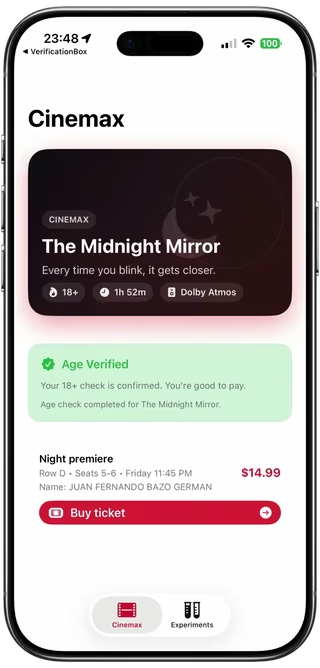
Try the age-check demo, review the exact requested details, and complete the phone flow.
Personal Identity API
Create a session. Send the launch URL. Fetch the approved result. Verification, consent and device routing are handled for you.
Need the product and business overview? See FOR COMPANIES →
INTEGRATION STEPS
POST /v1/sessions
Use launch_url or qr_url; native iOS apps open app_clip_url unchanged.
session_id + result_token
GET /v1/sessions/{id}/result
One-time exchange on your backend.
Optional: check session status GET /v1/sessions/{id}
API keys stay on your backend. Verified personal data is not placed in callback URLs.
A backend-owned session starts the flow; approved identity information is fetched server-to-server.
Test in the Customer Portal
Use a test account to choose requested fields, configure a callback, run the Session Example, and inspect the real request, response, session status, and structured result.
Agent-ready integration skill
One secure source for test setup, server-side sessions, callbacks, results, launch behavior, and concise patterns for Node, Python, Swift, Kotlin, Java, Go, PHP, Ruby, and cURL.
Postman collection
Use a Test key to try the collection. Keep the idempotency key for retries and fetch the result once on your backend.
Illustrative values below are not reusable credentials. Use the actual returned URLs, IDs and deadlines.
Base URL: https://api.verihop.com
Authenticate partner requests from your backend only:
Authorization: Bearer <api_key>GET requests have no request body. Session status and result reads use the matching Test or Live key; JWKS needs no API key.
Create a test account first to get an API key for integration. Test-account responses are redacted by design, and the same account can later be upgraded to active for production.
Test redacts returned personal values; phone checks still process identity data. Live access requires separate use-case, field, callback and go-live approval.
/v1/sessionsCreate a verification session and receive the public launch fields.
The examples use a Test key. Live verification settings are provided when your account is activated.
This example requests Personal Details and document details from either an ID card or a passport; it does not require both.
expires_at as the absolute deadline. Opening the link or continuing verification never extends this deadline.Authorization: Bearer <api_key>
Content-Type: application/json
Idempotency-Key: <uuid>{
"app": "RideNow",
"header": "Identity details",
"fields": ["legalName", "over18", "documentNumber", "documentExpiry"],
"allowedDocuments": ["idCard", "passport"],
"callback": "https://partner.example/verihop/callback"
}app: Partner app display name shown inside Verihop (max 80 chars).header: Short verification title shown to the user (max 120 chars).fields: List the catalog tokens you need. An omitted or empty list requests no fields.allowedDocuments: Optional document-type allowlist using passport, idCard, driverLicense, or residencePermit. Omit it to accept any supported document type; do not send an empty array.callback: Base return URL sent in POST /v1/sessions. Verihop opens it after completion and appends session_id, result_token (success path), and optional callback_jwt; required and allowlist-validated in your production policy.fields says which verified values you request. allowedDocuments says which document types may provide evidence.
{
  "fields": ["legalName", "over18"],
  "allowedDocuments": ["passport", "idCard"]
}
This means Passport OR ID Card is eligible. It does not require both. The user chooses the concrete document used by each relevant section in the Verihop app.
passport, idCard, driverLicense, and residencePermit are cumulative document-type assertions (AND). A request such as ["legalName", "passport", "idCard"] requires Passport + ID Card.documentNumber, documentExpiry, documentCountry, and documentNationality are one detail bundle. With explicit required types, they apply to each compatible required contributor; without one, the holder chooses one eligible document for the whole bundle. Driving licences do not supply documentNationality.type is not a unique identifier; receipt-backed partner evidence is distinguished by receiptId.documentNationality is also invalid.Authorization: Partner API key in bearer format.Content-Type: Use application/json for request body parsing.Idempotency-Key: Recommended for creation retries. Generate a UUID for each new attempt and reuse it only with the identical request body.201 response{
"session_id": "sess_123",
"expires_at": 1893456900,
"launch_url": "https://www.verihop.com/verify.html?session_id=sess_123&token=h_example123456789",
"app_clip_url": "https://appclip.apple.com/id?p=KycBox.VerifyBox.Clip&session_id=sess_123&token=h_example123456789",
"qr_url": "https://www.verihop.com/verify.html?session_id=sess_123&token=h_example123456789",
"status_url": "https://api.verihop.com/v1/sessions/sess_123"
}session_id: Unique session identifier for tracking and result retrieval.expires_at: Session expiry (Unix epoch seconds).launch_url: Primary URL for web, Android, QR codes, emails, SMS, and general handoff.app_clip_url: Direct native App Clip URL for iOS partner apps. Open it exactly as returned; do not reconstruct it.qr_url: QR-safe URL; currently equivalent to launch_url.status_url: Session status endpoint for server-side polling.401 missing_bearer_token, 401 invalid_api_key403 customer_inactive400 missing_callback_url, invalid_callback_url, callback_host_not_allowed400 field_not_allowed, invalid_field_token, invalid_allowed_documents409 idempotency_key_conflict, idempotency_key_in_progress, idempotency_key_expired413 request_too_large429 rate_limit_exceeded, daily_quota_exceeded/v1/sessions/{id}Optional: monitor session progress without fetching personal data.
Authorization: Bearer <api_key>200 response{
"session_id": "sess_123",
"status": "issued",
"issued_at": 1893456000,
"expires_at": 1893456900,
"last_status": null,
"last_status_at": null,
"opened_at": null,
"result_available": false,
"result_token_expires_at": null
}A completed session can show status: "used" and last_status: "success". result_available means a result was stored; it can remain true after consumption or expiry. Fetch the result once, before its deadline.
Polling is read-only and never marks a session as opened. A completed Test-key session also includes result_token, so you can fetch its redacted result in Postman. Live result tokens come through the callback.
/v1/sessions/{id}/resultFetch verified result payload server-to-server using one-time result token.
A launch token starts with h_ and cannot be used here. X-Result-Token requires the short-lived res_ token from a live callback or completed test-key status response.
Authorization: Bearer <api_key>
X-Result-Token: <result_token>200 responseIllustrative Test response for the request above: the user chose an ID card. Personal values are redacted; IDs and timestamps are examples.
{
  "session_id": "sess_123",
  "status": "success",
  "result": {
    "legalName": "XXXTEST_USERXXX",
    "over18": "XXXTEST_USERXXX"
  },
  "personalDetailsDocument": {
    "type": "idCard",
    "issuingCountry": "ESP",
    "receiptId": "dr_AAAAAAAAAAAAAAAAAAAAAAAA"
  },
  "documents": [
    {
      "type": "idCard",
      "issuingCountry": "ESP",
      "receiptId": "dr_AAAAAAAAAAAAAAAAAAAAAAAA",
      "details": {
        "documentNumber": "XXXTEST_USERXXX",
        "documentExpiry": "XXXTEST_USERXXX"
      }
    }
  ]
}
result contains requested Personal Details only. personalDetailsDocument identifies the verified document selected by the user as their Personal Details source. The same document also appears in documents[]; that duplication is deliberate and is not an additional verification.
Document-only results omit personalDetailsDocument.
documents[] contains every unique document that supported the Session: the Personal Details source, generic Document Details source, and each exact required-document source. Every entry contains type, issuingCountry, receiptId, and details. When no document details were requested, details is {}. Internal field attribution is never exposed.
receiptId points to that document’s historical verification evidence.documents[].receiptId independently with GET /v1/document-receipts/{receipt_id}. There is no combined receipt endpoint or combined JWS.410 result_token_expired; receipt reads and verification stay independent.verified_at; reuse is not represented as a new document verification.Test mode preserves this exact structure and redacts only actual Personal Details and document-detail values with XXXTEST_USERXXX. It does not redact type, issuingCountry, receiptId, or structural keys.
401 missing_bearer_token, invalid_api_key, missing_result_token403 customer_inactive, api_key_environment_mismatch, invalid_result_token410 result_token_expired409 result_token_used404 result_not_available, session_not_found503 document_receipt_unavailable/.well-known/jwks.jsonPublic verification keys for callback JWTs and Document Receipts.
No API key is required. The cache lifetime is 300 seconds. Verify signatures and claims on your backend; if key discovery fails or the key is unknown, stop verification.
200 response{
"keys": [
{
"kty": "RSA",
"kid": "example-key-id",
"alg": "RS256",
"use": "sig",
"n": "...",
"e": "AQAB"
}
]
}DOCUMENT RECEIPTS · OPTIONAL
/v1/document-receipts/{receipt_id}Retrieve an already-issued Document Receipt from your partner backend. Persistent retrieval is an optional extension to the four-step Sessions integration.
Authorization: Bearer <api_key>receiptId values returned by GET /v1/sessions/{id}/result to retrieve them.dr_.... Internal receipt identifiers and data-model terminology are not part of the public contract.200 response{
"receiptId": "dr_AAAAAAAAAAAAAAAAAAAAAAAA",
"receiptVersion": 1,
"issuedAt": "2026-09-11T12:00:00.000Z",
"document": {
"type": "idCard",
"issuingCountry": "ESP"
},
"receipt": "eyJhbGciOiJSUzI1NiIsImtpZCI6InZocmNwdC1yczI1Ni0yMDI2MDkxMS0wMSIsInR5cCI6InZlcm...eyJyZWNlaXB0X3ZlcnNpb24iOjEsInZlcmlmaWNhdGlvbiI6ey4uLn19.signature-placeholder"
}The abbreviated signature above is a display placeholder, not a cryptographically valid sample receipt. receipt contains the original compact signed JWS, not a URL. The response identifies the document by type and issuing country without identity PII.
dr_ identifier does not authorize access.404 document_receipt_not_found.verihop_v1 methodology and signature verificationThe partner-facing methodology is verihop_v1, version 1. Verihop obtains document information from the supported document, runs its holder-verification flow, checks liveness, and matches the presented person against the document-holder evidence.
verified, holder verification passed, and liveness passed.Decoding a compact JWS is not signature verification. Verify on your backend with the configured Verihop JWKS endpoint. Require alg=RS256, typ=verihop-document-receipt+jwt, a recognized receipt-purpose kid, the configured issuer, and the audience derived from your trusted partner configuration. Do not take a key URL, expected audience, or trust decision from the unverified token. Callback and Document Receipt signing keys are separate purposes.
400 invalid_document_receipt_id401 missing_bearer_token, 401 invalid_api_key403 customer_inactive, 403 api_key_environment_mismatch404 document_receipt_not_found409 document_receipt_revoked, 423 document_receipt_held, 410 document_receipt_erased503 document_receipt_verification_unavailable, 503 document_receipt_unavailablefields)legalName, dateOfBirth, over18, over21, passport, idCard, driverLicense, residencePermit, documentNumber, documentExpiry, documentCountry, documentNationality
result contains requested Personal Details: legalName, dateOfBirth, over18, and over21. Requested document attributes appear in documents[].details. Type requirements such as passport and idCard require those documents; they do not add a boolean field to result or include every document attribute.
Yes. Your backend creates a session using POST /v1/sessions, then renders the returned qr_url inside a QR shown on the desktop page. The user scans that QR with their phone and Verihop opens the best available experience.
Best UX is direct launch: encode the returned qr_url. It is the same universal HTTPS handoff as launch_url and supports app, lightweight, and web fallback paths.
Use launch_url on Android and for general web handoff. An iOS partner app that wants the native App Clip card should open the returned app_clip_url. Your callback shape remains the same: Verihop appends session_id, success-path result_token, and optional callback_jwt.
Create the session on your backend and send the returned app_clip_url to your iOS app. Open that URL with SwiftUI Link or UIApplication.open on iOS 17 or later. Do not parse launch_url, copy its token, or hard-code Verihop's App Clip bundle ID. If the full Verihop app is installed, iOS opens it instead while preserving the same session.
If you use a custom callback such as ridenow://verified, the Android partner app must declare an intent filter for that scheme and host. If you use an https:// callback for desktop or web-started flows, treat it as a backend endpoint unless your Android app owns that domain with verified App Links.
Use an https:// return endpoint on your backend. Verihop opens that URL on the phone with session_id and the success-path result_token in the query. This is a user return, not a server-to-server webhook. Your backend validates the stored session binding and fetches GET /v1/sessions/{id}/result. The desktop page can check your backend for completion.
No. Creation returns orchestration fields and opaque launch URLs, not a JWT or private identity values. Open the returned URL unchanged.
A successful return includes session_id and result_token, plus callback_jwt when enabled. Some app flows also include status or source metadata. These are not personal results or proof of verification. Validate the session binding, verify any supplied callback JWT, and fetch the approved result on your backend.
callback_jwt, and where?Yes, on partner backend when present. Verify signature and claims using Verihop JWKS at GET /.well-known/jwks.json. Validate issuer/audience/expiry and ensure JWT claims match callback query values.
No. Keep API keys server-side and fetch results from your backend only. The frontend/web client should only handle UI and pass state to your backend session.
Reconcile a consumed, expired or uncertain result exchange first. Never automatically retry result GET or create another Session. Only a deliberate new logical action starts a new attempt.
Open the returned launch_url or qr_url; the hosted handoff provides the supported app, App Clip, or installation guidance. On Android, the user can return after installation and tap Open Verihop while the session is still valid. Do not create a replacement merely because installation was needed. After expiry, let the user deliberately start a new attempt.
POST /v1/sessions supports Idempotency-Key for retry-safe create-session calls: same key + same payload replays the original response, while same key + different payload returns 409 idempotency_key_conflict. Misuse is further mitigated with API-key auth, callback allowlist policy, field allowlist checks, per-customer rate limits/quota, short session TTL, and one-time result_token.
Start in test mode
Use a redacted test account, keep credentials on your backend, and move to production only after callback and field controls are approved.
Privacy-focused identity verification
Request verified identity or eligibility details. Customers complete the check on their phone and approve what is shared.
For example:
not ID pictures or selfie files.
From check to trusted details
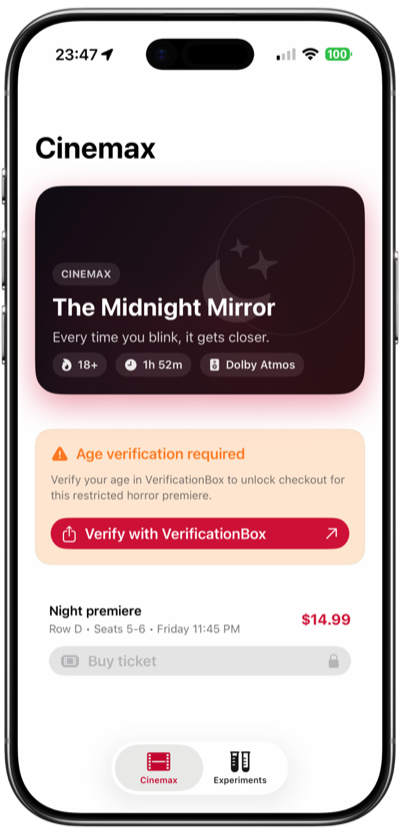
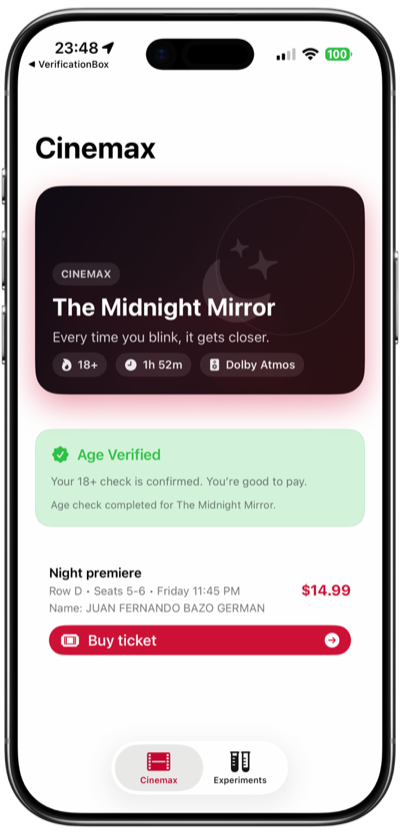
A service asks for specific details. The customer completes verification on their phone, reviews the request and approves sharing. The service receives the approved result.
Why this matters
Verification should help customers continue, without turning a single decision into another document archive.
of UK consumers surveyed had abandoned an account-opening process.
FullCircl, State of Identity Verification 2025of people in the Netherlands surveyed said they would never share a copy of their passport, ID card or driving licence online.
CBS, 2025In the same FullCircl study, average onboarding took 35 minutes, 2.8 times longer than customers said they wanted. FullCircl, State of Identity Verification 2025
The Dutch privacy regulator reported 39,407 personal-data breach notifications in 2025. Autoriteit Persoonsgegevens, 2026
What you gain
Select a benefit to see how it works.
MRZ and NFC chip reading support the holder comparison.
Completion time can vary by device, document and connection.
A successful verification returns the result without a routine manual-review queue.
Receive approved fields, not the customer’s passport image or selfie.
Customers can approve a saved on-device verification when it remains valid and your policy accepts it.

Start with the decision
Age & eligibility
Request a verified age result.
Account onboarding
Check the details your onboarding decision needs.
Rentals & access
Verify identity before access is granted.
Account recovery
Request a fresh check for sensitive actions.
Verihop verifies the approved details. Your company makes the decision.
Customer Portal
Run redacted sessions and inspect the handoff.
Submit your production setup and field scope for review.
Monitor sessions, callbacks, usage and team access.
Start with one use case
Bring your customer journey and decision. We’ll map the smallest useful request and a path to testing it.